How do I read my dashboard?
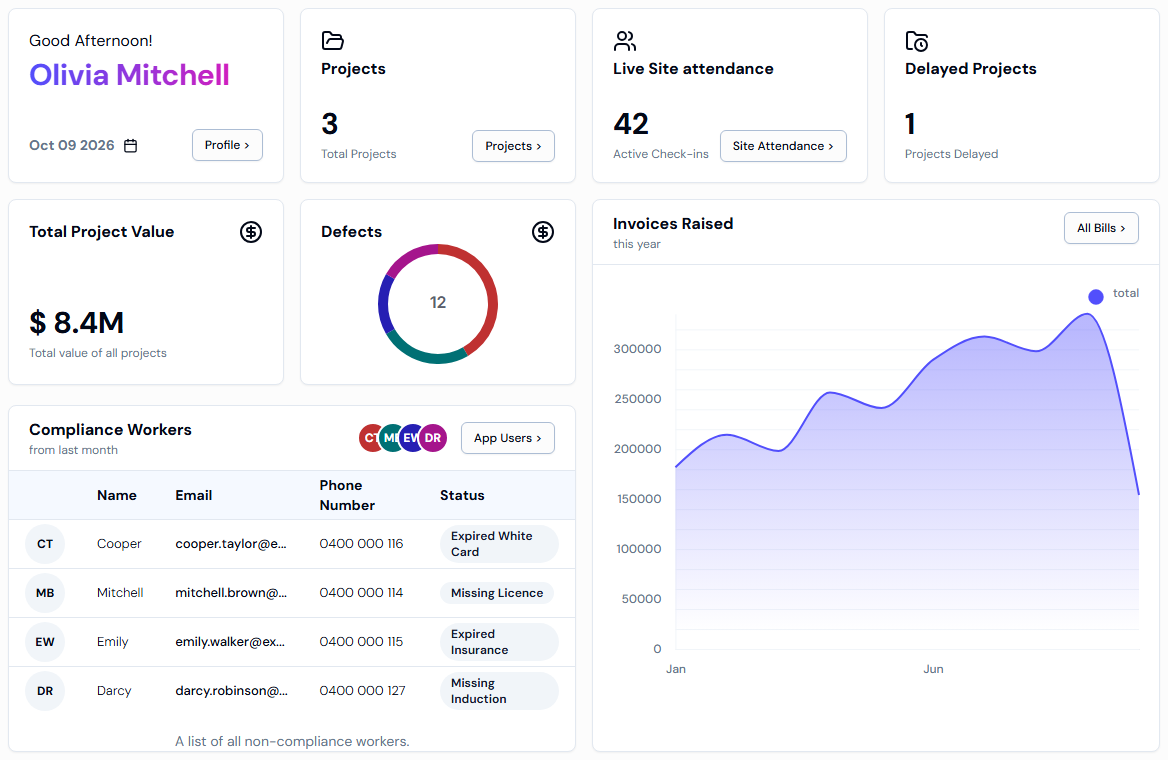
The Dashboard is the first page you see after you log in. Each card gives a quick summary of your whole organisation: projects, who's on site, late projects, workers who need follow-up and what you've invoiced.
What the Dashboard is
- A one-page summary of your business.
- It opens on its own after you log in. To come back to it, click Dashboard in the left menu, under Platform.
What each card shows
- Projects: Total Projects is the number of projects in your organisation. Click Projects > to see the full list.
- Live Site attendance: Active Check-ins is the number of workers checked in on site right now. Click Site Attendance > to see who they are and where.
- Delayed Projects: how many projects are running behind schedule.
- Total Project Value: the combined value of all your projects. $1.5M means 1.5 million dollars and $250K means 250 thousand dollars.
- Defects: a ring chart of problems found in the work, grouped by the reason they happened. Each colour is a different reason.
- Compliance Workers: workers from last month who are not compliant, for example because their documents are missing or out of date. Click App Users > to open your full list of workers.
- Invoices Raised: the total value of bills raised in each month this year. Point your mouse at a month to see its amount. Click All Bills > to open your bills.
Good to know
- The Dashboard doesn't update by itself. Refresh the page to see the latest numbers.
- While the page is loading you'll see grey boxes in place of the cards.
- No defects found ! or Compliance Workers Not Found ! is good news: nothing is recorded, or no workers need follow-up for last month.
If something goes wrong
- Projects >, Site Attendance > or All Bills > is missing: these only appear when a project is selected next to Project: at the top of the screen. Click it and choose any project. If your organisation has no projects yet, create one first. See How do I create a project?
- Something went wrong in getting dashboard details.: refresh the page. If it keeps appearing, contact Swift Checkin support.
- Dashboard isn't in the left menu: the menu only shows features turned on for your organisation. Ask your account admin or Swift Checkin support.