What is a suspicious check-in?
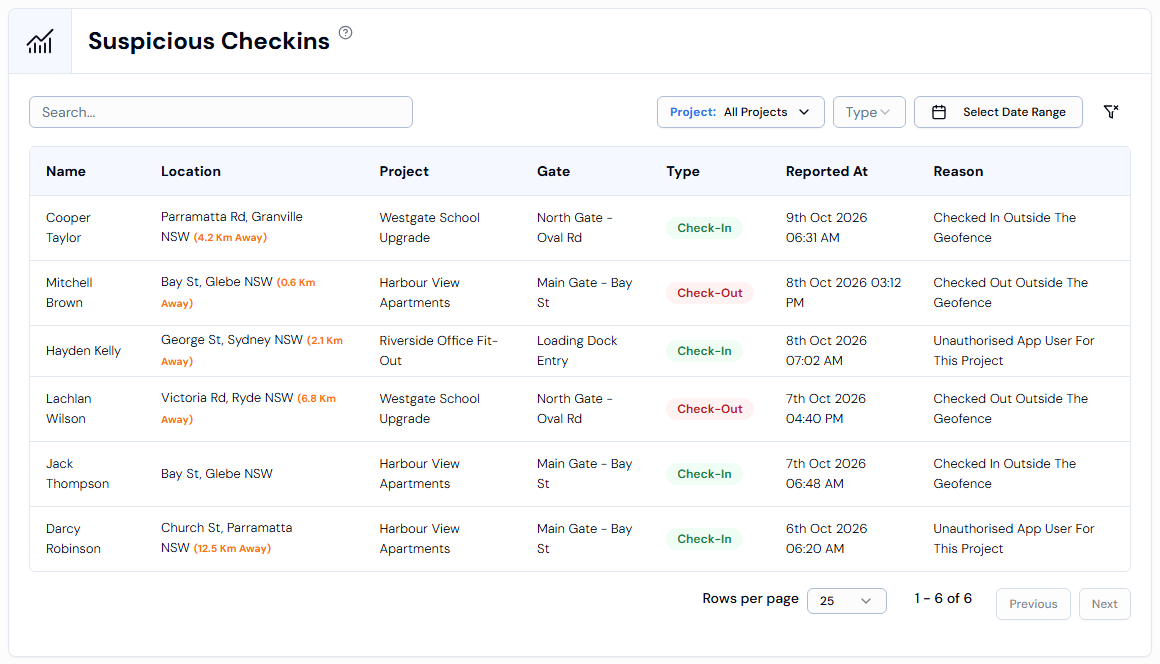
A suspicious check-in is a check-in or check-out that doesn't match the rules for the site, for example the person wasn't at the site when they tapped the button. Swift Checkin lists them on the Suspicious Checkins page.
Why a check-in gets flagged
- Outside the geofence: the person checked in or out while they weren't inside the site area. A geofence is an invisible boundary drawn around a site location on the map.
- Unauthorised app user: the person isn't allowed to check in at that project or location.
- Other reasons may also appear. The Reason column shows the reason for each entry.
Where to see them
- In the left menu, under Field Operations, click Suspicious Checkins.
- Each row shows the Name, Location (and how far from the site, if known), Project, Gate, Type (check-in or check-out), Reported At and Reason.
- Filter with Search..., Project:, Type and Select Date Range.
Good to know
- The Suspicious Check-ins card on the Site Attendance page shows how many happened on a day.
- This page is part of the paid plan. Without an active subscription you'll see Upgrade to Premium Version to view the CheckIns.
- To follow one up, see What do I do about a suspicious check-in?