What is an app user?
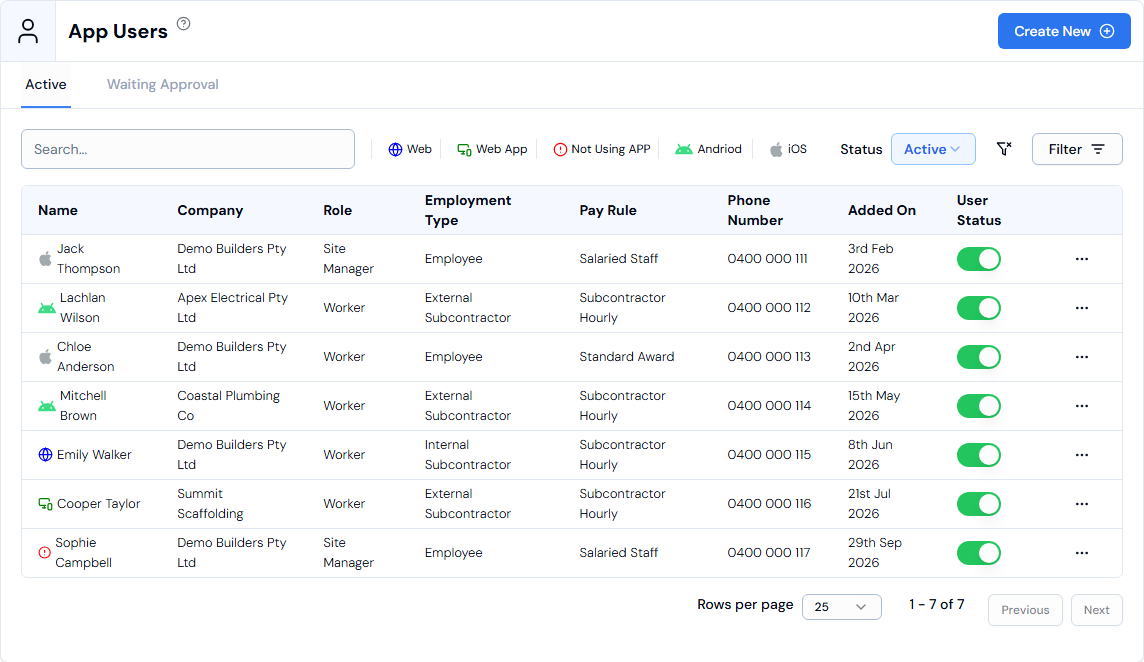
An app user is a worker or site manager who uses the Swift Checkin mobile app to check in and out of site. You manage them on the App Users page.
What an app user is
- A person who checks in and out of site with the mobile app.
- Different from an admin user, who logs in to the web platform.
- Each app user has an Employment Type, a Worker Category, a Pay Rule and an app Role.
Employment types
- Employee: employed directly by your business on a salary or wage, and paid through your payroll.
- Internal Subcontractor: an independent tradesperson with their own ABN who works for you at an agreed hourly rate. They can submit invoices in the app and manage their own tax and super.
- External Subcontractor: a worker supplied by an external subcontracting company. You are billed through that company.
App roles
- Worker, Site Manager or Admin.
- Employment type is about how someone works with your business. What they can do in the app is set by their Role.
Where to find app users
- In the left menu, under Platform, click App Users.
- The Active tab lists app users who are set up and using the app.
- The Waiting Approval tab lists app users who have been invited and are waiting for approval from your organisation.
Good to know
- Move your mouse over an app user's name to see a quick summary: role, company, phone number, email, whether they are a high-risk worker, and whether time tracking is on.
- When Time Tracking is on, Swift Checkin creates timesheets for the app user and tracks their hours.
- To add one, see How do I add an app user?