How do I edit or delete a company?
Help Centre category: User & Worker Management
What this helps you do
Keep a company's details up to date, or remove a company you no longer work with.
Steps
To edit a company
- In the left-hand menu, under Platform, click Companies.
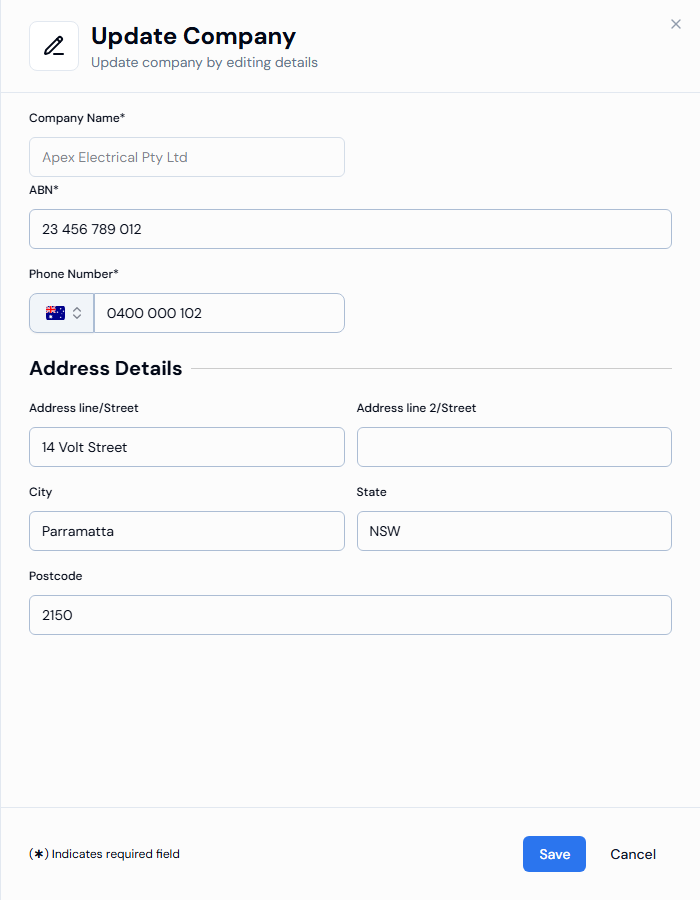
- Open the company and click Edit in the Company Details section. You can also click ... at the end of the company's row and choose Edit.
- Change the ABN*, Phone Number* or address details.
- Click Save.
To delete a company
- In the left-hand menu, under Platform, click Companies.
- Click ... at the end of the company's row and choose Delete.
- Confirm to delete.
warning
Deleting a company cannot be undone. Check that you have chosen the right company before you confirm.
Expected result
- After editing, you see Company details updated successfully.
- After deleting, you see Company deleted successfully. and the company is removed from the list.
Troubleshooting
Why can't I change the company name?
The company name cannot be changed after the company is created. If the name is wrong, contact SwiftCheckin support.
Why can't I save my changes?
A required field is empty or the phone number does not match the country on the flag. A message under the field tells you what to fix.
Why is there no Delete option?
The company is your own business (the default company). It cannot be deleted.