Fix check-in problems
Find the message on your screen below, do the fix, then tap Check-in again. Still stuck? Your site manager can check you in or out from their phone.
Location problems
Your company may check that you're on site. These are fixed on your phone.
| What you see | Why | What to do |
|---|---|---|
| Location is Off | Location is turned off on your phone. | Turn location on. |
| A message asking you to turn on Precise Location | Precise Location is off, so the app can't tell exactly where you are. | Turn on Precise Location. See Turn on Precise Location. |
| Turn on "Always" location access (iPhone) or Turn on "Allow All The Time" location access (Android) | Your site checks you out when you leave. | Follow the steps on screen. See Breadcrumbing. |
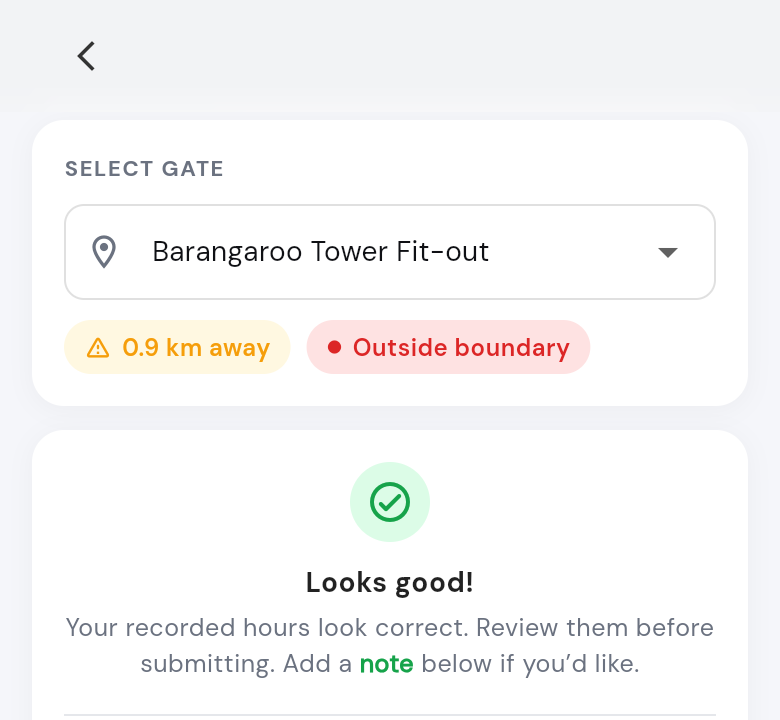
| OUT OF LOCATION, or a message saying you're away from the site | You're outside the site boundary. | Walk closer to the gate. Check you picked the right gate in Select Gate. |
| You're on site, but it says you're away | Precise Location is off, you're on an upper floor, or the site has weak signal. | You can still check in. See Why can't I check in when I'm inside the site boundary? |
Turn on Precise Location
- iPhone: open Settings, tap SwiftCheckin, then Location. Turn on Precise Location.
- Android: open Settings, tap Apps, then SwiftCheckin, then Permissions, then Location. Turn on Use precise location.
Go back to the app and tap Check-in again.
Project problems
| What you see | Why | What to do |
|---|---|---|
| Your project isn't in the list | You haven't been added to it, or the project is finished. | Ask your site manager. |
| Selected project is not available for the check-in process | You scanned a QR code for a project you're not added to. | Ask your site manager to add you. |
Account problems
| What you see | Why | What to do |
|---|---|---|
| No Active Organization, and no Checkin button | Your company hasn't accepted you yet. | Accept your invitation, or ask your site manager. |
| Limited Access | Your account with this company is paused. | Ask your site manager or office to turn it back on. |
| A message saying you're not on today's schedule | You're not rostered on today. Trying again won't help. | Talk to your site manager. |
| You forgot to check out Previous shift | Your last shift is still open. | Check those hours, then tap Submit Timesheet & Continue. |
Phone and device issues
| Problem | What happens | What to do |
|---|---|---|
| Battery is flat or the phone is off | You can't check in or out. | Charge your phone. Ask your site manager to check you in or out on your behalf. |
| No internet or weak signal | You can't check in or out. The app can't save it for later. | Turn on mobile data or Wi-Fi, or move to better signal. Tell your site manager when you arrived. |
| Location is off | Your check-in is blocked or marked suspicious. | Turn location on. |
| Precise Location is off | The app says you're away from the site. | Turn it on. |
| Location isn't set to Always | On sites with breadcrumbing, your check-in doesn't finish. | Set location to Always (iPhone) or Allow all the time (Android). |
| Battery saving closes the app (Android) | Automatic check-out may not work. | Turn off battery saving for SwiftCheckin. |
| Notifications are off | You miss check-out reminders and messages. | Turn on notifications for SwiftCheckin in your phone's Settings. |
| Camera is blocked | The QR scanner doesn't open. | Allow the camera for SwiftCheckin. |
| You tapped Don't allow by mistake | That feature doesn't work. | Open your phone's Settings > SwiftCheckin and turn it on. |
| New phone | Your account is not on it yet. | Install the app and log in with your mobile number and passcode. |
Messages you may see
| Message | What to do |
|---|---|
| No internet connection. | Turn on mobile data or Wi-Fi. |
| Internet connection is weak. | The map is skipped. Pick your project from the list and check in. |
| Unable to reach the server. or Taking Too Long | Tap Retry, or try again with better signal. |
| Update Required | Tap Update Now to update the app. |
| Timezone Mismatch | Tap Update Timezone to use your phone's timezone. |
Suspicious check-ins
A suspicious check-in doesn't match the site's rules. Your work clock still starts, and your site manager and the office can see it.
If your company checks your location:
| What happened | What to do next time |
|---|---|
| Location was turned off on your phone. | Turn location on before you check in. |
| Precise Location was turned off, and you checked in anyway. | Turn on Precise Location when the app asks. |
| You were outside the site boundary. | Walk closer to the gate, then check in. |
| You're not added to the project. | Ask your site manager to add you. |
| You checked in without location, using the Check-in assistant. | Only do this if you really are on site. |
The same rules apply when you check out.
If you're on an upper floor or the site has weak signal, your check-in is marked as low accuracy instead, so the office knows.
Questions and answers
Why can't I check in when I'm inside the site boundary?
There are three reasons:
- Precise Location is off. Turn it on, or check in anyway and it's marked suspicious.
- You're on an upper floor, so your phone can't find your exact spot. You can still check in as low accuracy.
- The site has weak signal. You can still check in as low accuracy.
Why isn't my project in the list?
You haven't been added to it, or it's finished (finished projects don't show). Ask your site manager.
What if the same problem stops me 3 times?
On some sites, the Check-in assistant opens and, for location problems, asks Do you want to check in without location? Tap Yes to check in anyway (marked suspicious), or No, I'll move closer to try again.
I was on site, but my check-in was marked suspicious. Why?
Precise Location may be off, or the site boundary may be in the wrong place. Tell your site manager so they can check.
Will a suspicious check-in affect my pay?
It might, as the office may check your hours before approving your timesheet. You can't remove the mark, so tell your site manager what happened.